Design, Build, Ship · Assignment 1 · Accelerated Prototyping

25 directions. One final portfolio.

Assignment 1 for Design, Build, Ship: 25 landing-page prototypes for Anees Amjad’s portfolio, written for AI engineering recruiters, startup teams and collaborators. Each version tests a different direction; later versions converge on the one Anees selected.

View the selected portfolio (v25) →

Audience
AI engineering recruiters, startup teams, potential collaborators
Visitors should understand
What Anees builds, what Anees personally contributed, and how to get in touch
Positioning
“I build AI tools and data products for real-world decisions.”

Final selection — Anees Amjad

v25 · Final portfolio →

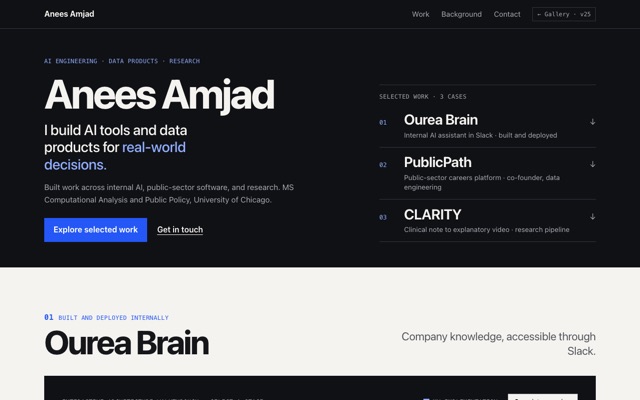
Anees selected v25 on 6 October 2026. Later that day, at Anees’s request (Anees found the previous presentation too restrained), its art direction was redesigned: an ink-dark opening with a project index, then full-width cases with three different visual compositions. The permanent sidebar was removed. Anees had not reviewed the redesigned appearance when this was written. Anees’s original selection rationale, written for the sidebar layout, is preserved under “Anees’s goals and choices” below.

Why this version won: v23, v24 and v25 compared

AI-assisted design critique supporting Anees’s final choice above. These are design observations, not user-testing results.

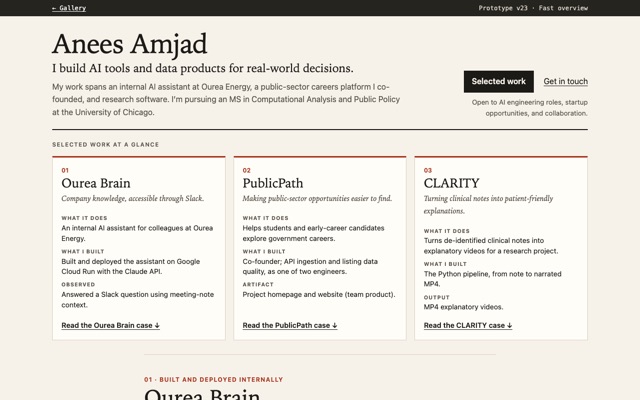
  • v23 · Quick overview

    Strength: strongest quick overview. Cost: the detailed work only follows substantial summary cards.

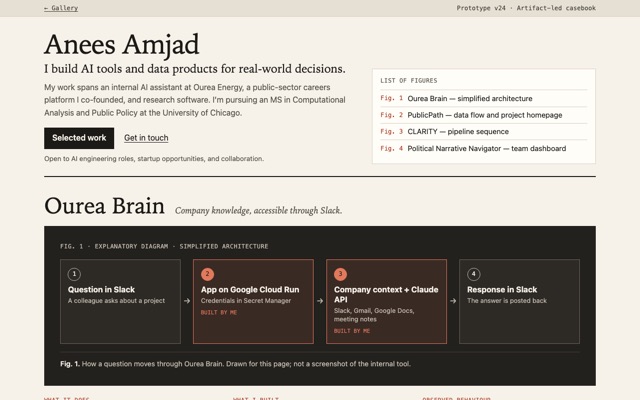
  • v24 · Artifact-led cases

    Strength: strongest visual emphasis. Cost: large figures and divided text make reading more fragmented.

  • v25 · Final selectionChosen

    At selection: complete first case immediately available, continuous reading, persistent project navigation; trade-off, a narrower desktop reading area. After the art-direction redesign (implementation note, not yet reviewed by Anees): full-width cases replace the narrow column; the project index now sits in the opening instead of staying in view.

How the design evolved

  1. 1 · Explore (v01–v12)

    Twelve deliberately different directions for the same portfolio: editorial, terminal, policy memo, pipeline schematic, brutalist, map, single column, scorecard, newspaper, bento, audience selector, exhibition.

  2. 2 · Converge (v13–v24)

    An AI-assisted design review pointed toward v01’s typography, v04’s contribution diagrams and v12’s labels. Content moved to verified CV facts. v13–v20 recombined those ideas in new structures; Anees chose v21’s AI-first order over v22’s product-first order; v23 and v24 tested fast overview against artifact-led cases.

  3. 3 · Decide (v25)

    v25 combined v23’s quick project choice with v24’s visible diagrams in a persistent sidebar layout, and Anees selected it. A late art-direction revision then replaced the sidebar with an ink opening and project index, and gave each case its own composition.

All 25 versions ↓ · Decisions, corrections and checks ↓

Versions

  1. v01Project-first editorialOpen v01 →

    HypothesisRecruiters skim for evidence of real work, so leading with one project (PublicPath) and spelling out my exact contribution in a separate box will communicate more than a list of skills. An asymmetric, magazine-style layout should make that lead project feel deliberate rather than templated.

    Revision 1First screenshots showed the headline filling the whole first screen, so the "project-first" page didn't actually show the project there. Shrank the hero, removed a paragraph that repeated the contribution box, and dropped the staggered indents in the secondary list (they read as misalignment).

    External review inputStrong professional foundation; retain typography and ownership clarity, but deepen secondary-project evidence.

  2. v02Terminal sessionOpen v02 →

    HypothesisEngineers and technical recruiters read a command line as home turf. Framing the portfolio as a terminal session (whoami, ls projects/, cat README.md) should signal engineering fluency before a word is read, and the README gives PublicPath a natural lead slot. Risk: may read as a gimmick to non-technical visitors.

    External review inputCoherent terminal theme, but simulated commands add overhead without proving engineering ability.

  3. v03Policy memoOpen v03 →

    HypothesisShift tone toward the public-sector half of my work. A government memorandum (TO/FROM/RE, bottom line up front, numbered record of work) matches how policy teams read, and makes the MSCAPP identity visible. Risk: may feel dry or formal to startup readers.

    External review inputUseful structure and policy connection, but the memorandum identity overshadows the person and feels overly formal.

  4. v04Pipeline schematicOpen v04 →

    HypothesisShow my contribution instead of describing it. Each project is drawn as a pipeline on engineering grid paper, and the stages I built are highlighted in orange, so a recruiter sees my exact part of each system at a glance. Risk: the pipeline metaphor fits PublicPath well but is a stretch for projects without clear stages.

    External review inputBest ownership explanation; retain highlighted stages, but remove diagrams that merely repeat prose.

  5. v05Brutalist manifestoOpen v05 →

    HypothesisTest loudness as a strategy: enormous stacked type, hard black borders, one signal colour. Does an opinionated, poster-like page make me memorable among many portfolios, or does it overwhelm the content? The headline restates the positioning line as a manifesto.

    External review inputMemorable scale, but the slogan overwhelms the evidence.

  6. v06Chicago work mapOpen v06 →

    HypothesisUse place as the organizing idea. A stylised Chicago street grid with Lake Michigan, where each project is a pin and PublicPath is the big red one; a legend panel carries the detail. Ties the page to Chicago and to the geospatial side of my work. Risk: the metaphor is decorative, since pins are projects, not addresses (the page says so).

    External review inputPersonal Chicago reference, but non-geographic pins make the map mostly decorative.

  7. v07One calm columnOpen v07 →

    HypothesisStrip everything back: one narrow column of plain sentences, no cards, no colour blocks, no visual tricks. Tests whether clear writing alone is enough for a recruiter, and whether quietness reads as confidence or as too little effort.

    External review inputReadable and direct, but too little hierarchy for substantial work.

  8. v08Recruiter scorecardOpen v08 →

    HypothesisDesign for the skim. A candidate-snapshot card and a project table (contribution, stack, area) with working filter buttons in plain JavaScript. Where my brief has no stack for a project, the table says “Not listed” rather than guessing, which also exposes the content gap. Risk: feels like a database, not a person.

    External review inputUseful comparison structure, but empty fields and database styling feel unfinished and impersonal.

  9. v09Newspaper front pageOpen v09 →

    HypothesisTreat PublicPath as front-page news: masthead, headline, deck, drop cap, an “At a glance” box, and the other projects as briefs in a side rail. Tests whether a story framing makes the lead project feel more significant than a list item does.

    External review inputStrong lead-story hierarchy, but repetition and third-person voice weaken the personal introduction.

  10. v10Bento gridOpen v10 →

    HypothesisA modern product-page grid: tiles of different sizes and soft colours, with PublicPath, my part, the stack, and contact each getting their own tile. Tests whether chunking the content lets a visitor take in everything at a glance, versus feeling generic and template-like.

    External review inputEfficient scanning, but separate tiles fragment each project’s story.

  11. v11Choose your pathOpen v11 →

    HypothesisLet the visitor say who they are (hiring, building a startup, collaborating) and reshape the page: same facts, different order, framing, and call to action, plus an accent colour per path. Vanilla JS; without JS all three views show in sequence. Risk: an extra click before any content.

    External review inputFunctional audience adaptation, but the selector delays evidence and duplicates similar information.

  12. v12Museum exhibitionOpen v12 →

    HypothesisWildcard: present the work as an exhibition, with entrance wall text, framed abstract illustrations, and museum labels (title, medium = stack, role). Tests whether an unexpected, crafted framing makes the portfolio memorable without hiding the facts. Illustrations are labelled as not screenshots.

    External review inputThoughtful presentation, but abstract artwork and artist framing distract from engineering evidence.

  13. v13Editorial casebookOpen v13 →

    HypothesisEach project as a short case study: problem, my contribution, a compact system figure with my stages highlighted, then evidence. A compact hero plus a contents list keeps PublicPath on the first screen at laptop size.

    Builds on / rejectsKeeps v01’s serif type, asymmetric rail and project-first order; v04’s highlighted ‘my work’ stages, now small and only where they add information; v12’s concise labels (Role, Context, Stack). Rejects v05’s oversized slogan and v12’s abstract art; uses a real PublicPath screenshot instead.

    External review inputBest overall reading structure; retain case-study rhythm and role clarity, but shorten the opening and bring evidence higher.

  14. v14System atlasOpen v14 →

    HypothesisLet diagrams carry the structure: each project is a numbered ‘plate’, and the prose becomes annotations keyed to the diagram, so text and figure don’t repeat each other. A legend separates what I built, what I designed, and the surrounding system.

    Builds on / rejectsBuilds on v04’s ownership highlighting but answers the review note about diagrams that merely repeat prose: here the diagram is primary and the notes explain each step once. Keeps v01’s compact, project-first opening. Rejects v04’s decorative grid paper and engineering title block.

    External review inputStrongest system explanations; retain accurate diagrams and numbered annotations, but simplify the visual scaffolding and mobile layout.

    Structural revision (6 Oct, for distinctness)The original v14 used per-project diagram plates with side notes, too close to v04’s per-project pipeline rows. It was rebuilt as one combined swimlane atlas (one lane per system; rows: comes in → I built → then → comes out), with notes underneath. The original remains in Git history (commit bd66f29).

  15. v15Evidence exhibitionOpen v15 →

    HypothesisLead with real artifacts, not descriptions: the live PublicPath homepage sits beside the intro on the first screen, and the team dashboard anchors the supporting work. Private work gets plain ‘design sheet’ and ‘pipeline sheet’ cards that say what can’t be shown and why.

    Builds on / rejectsInherits v12’s deliberate spacing and short labels (Artifact, Role, I built, Tools) but replaces its abstract artwork and artist framing with actual screenshots and honest spec sheets. Rejects decorative stand-ins for evidence.

    External review inputStrong artifact presentation; retain real evidence, but prevent a large product-marketing screenshot from overshadowing my contribution.

  16. v16Slide deckOpen v16 →

    Late structural revision (6 Oct, after v25 was chosen)Rebuilt as a vertical slide deck: a title slide, one full-height slide per featured project (visual beside text), then supporting work and contact, with gentle scroll-snap and a dot navigator that marks the current slide. This replaces the left-index-plus-pane layout that resembled v25’s sidebar. Original version: commit 558d26b.

    Original hypothesisTreat the portfolio like a reading app: a persistent project index beside a substantial reading pane, with PublicPath open by default so real work is visible immediately. Optional technical detail sits in a native details element. On narrow screens (or without JavaScript) the index becomes jump links and every pane stacks.

    Builds on / rejectsKeeps v11’s idea of letting the visitor steer, but drops its mandatory choice: the work is already showing. Keeps v13’s per-project structure (role, tools, copy, flow, evidence) inside each pane. Rejects v10’s fragmented tiles; each project stays one continuous story.

    External review inputUseful browsing pattern, but hidden panels reduce immediate exposure to the full portfolio.

  17. v17Problem-led narrativeOpen v17 →

    HypothesisOrganize the page around the questions the work addresses, not project names, so a collaborator sees the problem before the tool. Each question gets a colour band with ‘What I built’ beside ‘How it works’, and my steps are marked inline. The questions come from the project descriptions and READMEs.

    Builds on / rejectsInherits v09’s strong lead-story hierarchy without its third-person voice or repetition; keeps v04’s explicit ‘my work’ marking as small inline tags. Rejects v11’s audience selector: the framing serves every visitor without a click.

    External review inputUseful problem framing, but long questions repeat content and delay project names.

  18. v18Capability indexOpen v18 →

    Late structural revision (6 Oct, after v25 was chosen)Rebuilt as a back-of-book index: alphabetical capability entries, each pointing to the project that shows it, then the referenced projects. This removes the table structure it shared with v08 and tests whether a capability-first visitor can look things up like an index. Original version: commit 9bc887f.

    Original hypothesisAnswer a recruiter’s real question, ‘can this person do X?’, directly: engineering capabilities as rows, projects as columns, and every filled cell names its evidence. Full project notes sit under the matrix. On phones each capability becomes a card that lists only its evidence, with no blank cells.

    Builds on / rejectsKeeps v08’s comparison structure but drops what the review flagged: no ‘Not listed’ fields, and warm editorial type instead of database styling. Keeps v13’s featured-project copy and the real PublicPath screenshot below the matrix.

    External review inputUseful content audit, but sparse cells and decoding effort weaken the homepage.

  19. v19Annotated build sequenceOpen v19 →

    HypothesisGo deep on one build instead of wide on many: PublicPath’s pipeline as a vertical, step-by-step sequence, with what each step produces and whether it was my work or the platform’s. The other projects follow as contrasting builds seen through the same lens.

    Builds on / rejectsTakes v04’s ‘stage I built’ idea to its most explicit form, step by step. Keeps v13’s sticky role/tools summary and real screenshot beside the steps. Rejects v02’s simulated terminal: shows the engineering sequence plainly instead of dressing it as commands.

    External review inputStrong technical-detail material, but too much emphasis on one project and overly absolute output claims.

  20. v20Project drawersOpen v20 →

    Late structural revision (6 Oct, after v25 was chosen)Rebuilt as a single column of project drawers (native details/summary): each row shows number, title and a one-line summary, and opens in place to the full entry with its diagram or artifact. This replaces the card grid it shared with v10 and v23 with an open-in-place browsing model. Original version: commit 20c69f4.

    Original hypothesisLast broad exploration: every project appears at once as one uniform frame, like a photographer’s contact sheet, each a complete entry (artifact or diagram, title, contribution, link to details). Featured projects get an editor’s red frame, and each frame says whether it is a real screenshot or a simplified diagram.

    Builds on / rejectsAnswers v10’s fragmentation: one frame per project instead of separate tiles for role, stack and copy. Keeps v15’s rule that real artifacts are labelled as such. Diagrams are HTML rather than SVG, so they reflow on phones instead of scrolling sideways as v14’s did.

  21. v21Synthesis, AI-firstOpen v21 →

    HypothesisFirst convergence: an editorial portfolio with visible engineering evidence, led by Ourea Brain. A compact hero with a prominent name puts the first case’s architecture on the first screen; each case gives audience, my contribution, a numbered ‘how it works’, and labelled evidence, without repeating the same paragraph.

    Builds on / rejectsStructure from v13 (rail, case rhythm, role clarity) with a shorter opening; numbered steps from v14, drawn in HTML so they read on phones; artifact treatment from v15, with the PublicPath screenshot kept small and captioned as the team’s product. Uses v19’s detail only inside ‘How it works’, rewritten as mechanisms rather than guarantees.

    Anees’s evaluationChosen as the starting direction for the final convergence: “Leading with Ourea Brain introduces my deployed AI work first.”

  22. v22Synthesis, product-firstOpen v22 →

    HypothesisControlled comparison with v21: identical visual system and case content, but PublicPath leads, the intro names the platform first, and the first-screen artifact is PublicPath’s data flow instead of Ourea Brain’s architecture. Tests whether product-building or AI-system experience is the stronger introduction.

    Builds on / rejectsDeliberately near-identical to v21; only order, numbering, intro clause order and the hero artifact change. It is a convergence step, not one of the broad explorations.

    Anees’s evaluationNot chosen; Anees preferred the AI-first order of v21.

  23. v23Fast overviewOpen v23 →

    HypothesisCan a visitor understand my focus and pick a project in seconds? All three featured projects sit side by side right under a compact hero, each answering ‘what it does’, ‘what I built’ and ‘observed/artifact/output’. Full cases follow as one readable column, with the technical ‘how it works’ tucked into native disclosure elements.

    Builds on / rejectsStarts from v21 (Anees’s chosen direction), keeping its order, type and contribution marking. Removes v21’s hero diagram so the architecture appears only once, inside its case. New structure: overview band, then single-column long-read cases (not v20’s artifact frames or v16’s hidden panes).

  24. v24Artifact-led casebookOpen v24 →

    HypothesisLead every case with its visual: a full-width dark figure spread holding an explanatory diagram (and, for PublicPath, the captioned homepage beside the data flow), then three short columns: what it does, what I built, and observed behaviour, artifact or output. A ‘list of figures’ in the hero makes every visual findable.

    Builds on / rejectsBuilds on v21’s order and contribution marking, v14’s diagram clarity and v15’s artifact labelling, but changes the composition: figure first, text after, in full-width spreads (not v14’s side-by-side plates). Every figure states whether it is an explanatory diagram or a project artifact.

  25. v25Recommended synthesisOpen v25 →

    Original hypothesisCombine v23’s fast choice with v24’s visible contribution diagrams: a persistent profile sidebar keeps name, intro, actions, a one-line index of all three projects and contact visible while the cases scroll; each case shows a light, labelled diagram with my stages marked, then ‘what it does / what I built / observed behaviour, artifact or output’.

    Builds on / rejectsFrom v23: all three projects discoverable at once, and quick access to every project. From v24: diagram before prose, explicit diagram/artifact labels, and a small captioned screenshot. Drops v24’s heavy dark panels and v23’s hidden diagrams. Differs from v16: nothing is hidden; the sidebar is identity plus navigation, not a pane switcher. On phones the sidebar becomes the header, then the cases.

    Anees’s evaluationFinal selection (see top of page).

    Polish pass after selection (6 Oct, afternoon)Made after Anees chose v25; layout and content unchanged. One spacing scale for every case; diagram nodes with consistent padding, centred connectors and a consistent “my work” marker; an optional interactive architecture walkthrough for Ourea Brain (explains the system; not a live AI demo; full diagram and text remain without JavaScript); a project-in-view marker in the sidebar index; Copy email; print styles; local “AA” favicon. Anees had not reviewed these changes when this note was written.

    Late art-direction revision (6 Oct, ~17:00)Made because Anees explicitly found the previous presentation too restrained. Beige-and-rust editorial styling and the permanent sidebar replaced with an ink-dark opening (name, positioning, actions, typographic project index), warm-white case surfaces, a blue accent and large sans-serif type. Ourea Brain’s walkthrough sits on a dark technical panel; PublicPath pairs a framed screenshot with a narrow data flow; CLARITY uses an abstract explanatory illustration. Content unchanged. Previous state: tag pre-art-direction-redesign. Not yet reviewed by Anees.
Process record

Who decided what: Anees’s goals and choices; external AI-assisted review (labelled on each card); Claude’s implementation notes (“Builds on / rejects” on each card); and the checks that were actually run.

Anees’s goals and choices

  • Goal and audience

    A portfolio for AI engineering recruiters, startup teams and potential collaborators, positioned as “I build AI tools and data products for real-world decisions.”

  • Content decisions

    Use only facts from the CV, project materials or Anees’s own statements. Ourea Brain was built and deployed; PublicPath title is “Co-founder, Engineering and Data”; link joinpublicpath.com as “Project website”; Chicago Eviction Risk’s repository stays private; the team dashboard may be reused with credit.

  • Chosen direction (after v22)

    In Anees’s words: “Leading with Ourea Brain introduces my deployed AI work first. PublicPath should follow to demonstrate co-founder experience and data engineering, with CLARITY third to demonstrate another application of my engineering skills.”

  • Final choice

    v25, chosen by Anees on 6 October 2026. Rationale as written for the sidebar layout of that time: “I chose v25 because it puts a complete engineering case on the first screen while keeping my name, project index, and contact available. Ourea Brain leads because AI engineering is a central audience; PublicPath and CLARITY show the breadth of my product and research work. The final design combines editorial typography, diagrams that identify my contribution, and accurately labelled artifacts. I preferred its continuous reading experience to hidden project panels and its compact diagrams to v24’s larger visual spreads. The trade-off is a narrower desktop reading area and a mobile header that needs careful compression.”

Phases in detail

  1. v01–v12 · Go wide

    Twelve deliberately different directions: editorial, terminal, policy memo, pipeline schematic, brutalist, map, single column, scorecard, newspaper, bento, audience selector, exhibition.

  2. Review input

    An external AI-assisted design review (not user testing) evaluated v01–v12 and recommended combining v01’s editorial type and project-first order, v04’s explicit contribution and system diagrams, and v12’s spacing and concise labels. Its notes are shown on each card, attributed, until Anees records an evaluation.

  3. Content upgrade

    From v13, content comes from Anees’s CV and checked project evidence: real links, a live PublicPath screenshot, a team dashboard image, and diagrams labelled conceptual where the work is private.

  4. v13–v19 · Recombine

    Seven structurally different compositions built on the same principles, so the choice is between real alternatives, not variations of one template. Anees reviewed these before the final convergence.

  5. Distinctness audit (v01–v25), recalculated after late revisions

    Counted by information architecture, composition, reading order and interaction. Grouped as one design each: v01/v13/v21/v22 (rail-and-case skeleton; v21–v22 differ only in order), v12/v15 (framed artifact plus label, read top to bottom). Late structural revisions (6 Oct, after v25 was chosen, labelled on their cards) removed the three disputed overlaps: v16 is now a slide deck (not a sidebar layout like v25), v18 a back-of-book capability index (not a table like v08), v20 a column of drawers that open in place (not a card grid like v10 or v23). v14 had earlier become a swimlane atlas (not v04’s pipeline rows). Result: 21 distinct designs by this count. Remaining uncertainty: v23 and v25 both derive from v21’s content and type, though their structures differ (overview band plus long-read column vs. persistent sidebar), and the instructor may weigh shared typography differently. This audit covers only this gallery, not classmates’ work.

  6. v20–v22 · Converge

    v20 closes the broad exploration. v21 (Ourea Brain first) and v22 (PublicPath first) share one visual system so the only variable is which project introduces the portfolio. Anees chose v21.

  7. v23–v25 · Final convergence

    From Anees’s chosen v21: v23 tests a fast overview, v24 an artifact-led casebook, and v25 combines the strongest parts of both. External review notes on v13–v19 came from an AI-assisted critique; the build decisions and wording are Claude’s, recorded on each card under “Builds on / rejects”.

Factual corrections log

Content fixes, kept separate from design decisions. Layouts were not changed.

  • 6 Oct · Ourea Brain status

    Earlier versions described Ourea Brain as designed only. Anees confirmed it was built and deployed internally (Google Cloud Run, Claude API, answering in Slack). v01–v19 were updated in place; design-only labels and “intended” diagrams were replaced with a simplified architecture.

  • 6 Oct · PublicPath link and claims

    All versions now link the project website, joinpublicpath.com. v13+ label it “Project website” with a short note that job search was not loading when checked. The CV’s 50+ API and 50,000+ listing figures are not used because they could not be verified.

  • 6 Oct · Wording audits

    v19’s step results were rewritten as purposes (a schedule does not prove every run succeeded; deduplication and validation are mechanisms, not guarantees). Screenshot captions now say the homepage shows the team’s product.

Checks actually performed

  • Rendering

    Headless Chrome screenshots at 1280×800 and 390px wide for every version as it was built; final candidates (v21–v25) inspected section by section at both widths.

  • Keyboard

    Real Tab and Enter key events sent through Chrome’s DevTools protocol on v13, v14, v16, v18 and v20–v25 and on this gallery: every focused element showed a visible focus style; Enter followed the main links, opened v20’s drawers and moved v16 to the right slide.

  • Final version (v25)

    Checked at 1280×800, 1280×720, 390×844 and a 200%-zoom equivalent (640px wide): no sideways overflow, the sidebar fits without its own scroll region, and on narrow screens the first case starts after a compact header.

  • v25 art-direction revision

    Rendered and inspected at 1280×720, 390×844 and 640px wide (opening, all three cases, contact): no horizontal overflow; walkthrough, Copy email, JavaScript-off fallback and reduced motion re-checked.

  • v25 polish pass

    Re-checked at 1280×720, 1280×800, 390×844 and 640×360 (200% zoom): no sideways overflow, sidebar still fits without its own scroll. Walkthrough operated with real Tab/Enter/Escape key events; explanation area kept the same height across stages; reduced-motion setting removes transitions; with JavaScript disabled the full diagram and all four stage explanations are shown.

  • Structure and contrast

    Automated checks for one h1, heading order, image alt text, page-level horizontal overflow (none), broken local links and anchors (none), and WCAG contrast ratios of the key colour pairs (all ≥ 4.5:1 after fixes).

  • Not performed

    No user testing, no screen-reader testing, no real phones or Safari/Firefox. LinkedIn blocks automated requests, so that link is unverified. joinpublicpath.com loads, but its job search was failing when checked.